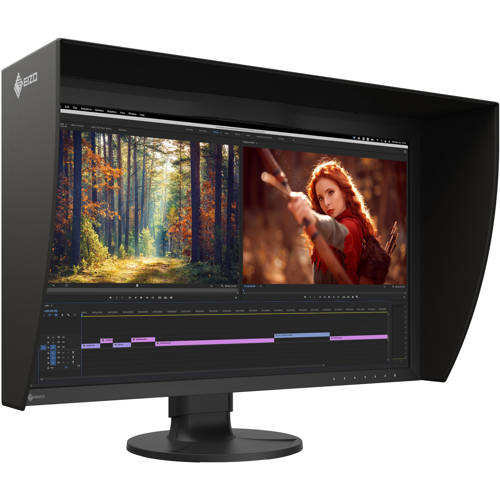



RENT EIZO Color Edge CG2700X 27" 4K HDR Monitor Kit
SKU: R-~EICG27XBK

Questions?

For more information on this item, questions about rates, special requests, or if you need any assistance, we’re here for you.
Call 212.627.8487
Email rent@adorama.com
Submit a Request Form
RENT EIZO Color Edge CG2700X 27" 4K HDR Monitor Kit Features
Dive Straight into Your Creativity
This flagship 27" monitor marks a new generation of ColorEdge with a new exterior design. With 4K UHD (3840 x 2160) resolution, 500 cd/sq.m high brightness & HDR gamma support, the monitor reproduces content in remarkable detail. USB Type-C connectivity provides a streamlined experience with video editing, game development & photography.
4K UHD Resolution
The ColorEdge CG2700X displays at 4K UHD (3840 x 2160) resolution, which is four times the size of Full HD. The remarkable detail ensures that high resolution content is displayed crisply. The 27-inch screen provides ample space for displaying 4K content natively or Full HD content in full with enough space to show toolbars, palettes, and other windows or applications. This makes the monitor versatile for video editing, 3DCG creation, game development, photography, and other creative fields.
Streamlined Connection
Single Cable Connection with USB Type-C
The ColorEdge CG2700X features USB Type-C connectivity that allows you to display video, transmit USB signals, and supply power to a connected device such as a tablet or notebook PC. This convenient multi-purpose connectivity makes it faster and easier to connect when moving between workstations or working remotely.
Power Delivery
The ColorEdge CG2700X reliably charges a MacBook Pro or other high-end laptops with 94 W power delivery. This eliminates the need for a laptop's bulky power supply unit, freeing up space in your bag and on the desk.
Stable Network Connection
While many modern laptops are not equipped with a dedicated LAN port, the monitor has one directly built in for stable wired connection. Connecting a laptop via USB Type-C provides access to the network through the monitor for sharing creative assets and files, carrying out post production work remotely, and enables network-based color management via ColorNavigator Network.
EIZO MAC Address Clone Utility software temporarily assigns the MAC address of a connected PC to the monitor, granting network access to authenticated devices, and preventing network access from unauthenticated devices.
Reliable Color Management
Built-In Sensor to Automate Your Workflow
ColorEdge were the first monitors in the world to have a built-in calibration sensor for color critical applications. The ColorEdge CG2700X's built-in sensor can be set to calibrate the monitor automatically at designated times. This eliminates the need for a third-party calibration device and ensures your screen stays color-accurate. In addition, the sensor swings onto the screen, taking up minimal space and allowing you to continue working even during calibration.
ColorNavigator 7 Color Management Software
A monitor needs to be calibrated at regular intervals to maintain color accuracy. EIZO's proprietary ColorNavigator 7 software provides an intuitive and highly precise solution to color management. It allows you to schedule automatic recalibration, calibrate all color modes simultaneously, and conduct correlation with external sensors to match the studio's internal color management framework. Calibration information is saved to the monitor instead of the operating system so users do not have to recalibrate even when using a different PC.
ColorNavigator Network Color Management Software
ColorNavigator Network provides centralized quality control (QC) of ColorEdge monitors for studios, printing houses, and other enterprises with multiple creators and editors who work on shared projects. With NetAgent or ColorNavigator 7 installed on the workstation, administrators can manage multiple ColorEdge monitors via web browser enabling quality control even from remote locations.
ColorNavigator Network is hosted on a secure cloud server to free you from the initial investment and running costs of providing your own server.
Color Precision
Vivid Colors Reproduced to Industry Standards
The monitor's wide color gamut faithfully reproduces 98% of the DCI-P3 standard used in digital cinema and supports the BT.2020 standard used in broadcasting. In addition, it covers 99% of the Adobe RGB color space so images shot in Adobe RGB will be displayed correctly. It also covers almost the entire ISO-coated and US web-coated CMYK color spaces used in printing.
3D LUT for Accurate Color Display
The monitor uses a 3D LUT which adjusts colors individually on an RGB cubic table. With the supported ColorNavigator 7 software's emulation function, creators can check how content will appear to their audience. The 3D LUT also improves the monitor's additive color mixture (combination of RGB), which is a key factor in its ability to display neutral gray tones.
10-Bit Simultaneous Display
Using the DisplayPort or HDMI input, the ColorEdge monitor offers 10-bit simultaneous display* from a 16-bit look-up-table (LUT) which means it can show more than one billion colors simultaneously. This is 64 times more colors than you get with 8-bit display, resulting in smooth color gradations and reduced Delta-E between two adjacent colors
Broadcast and Cinema Presets
Preset modes for DCI-P3, BT.709, and BT.2020 ensure you can work in the appropriate color spaces and gamma values. In addition, preset modes for PQ (DCI and BT.2100) and HLG (BT.2100) are available for viewing HDR content. With the built-in calibration sensor, you can conveniently adjust or maintain the brightness setting for each preset.
Post Production
HDR Gamma Support
The ColorEdge CG2700X features a high brightness level of 500 cd/m2. It supports HLG (hybrid log-gamma) and the PQ (perceptual quantization) curve for displaying and editing HDR (high dynamic range) video content. The optimized gamma curves render images to appear more true to how the human eye perceives the real world compared to SDR (standard dynamic range). This ensures professional creators can reliably display HDR content for editing and color grading.
True Black Display
In compliance with the DCI standard, the monitor offers a high contrast ratio of 1450:1 for producing true blacks that are otherwise difficult to display on a typical LCD monitor. CG Series monitors are also equipped with a retardation film which allows tones to retain their depth even when viewed from an angle.
DCI-4K Cropping
The DCI 4K Cropping function allows the user to display a DCI 4K (4096 x 2160) signal and crop content outside the bounds of the panel's native 4K UHD (3840 x 2160) resolution. Users can select from three options, that determine which part of the image is cropped.
Nearest Neighbor Interpolation
The ColorEdge CG2700X offers Nearest Neighbor interpolation setting as an option for image scaling and resampling. When upscaling, Nearest Neighbor copies and aligns pixels to the closest adjacent position, maintaining color fidelity. When Nearest Neighbor is turned off, the monitor uses an interpolation method that balances gradation of the surrounding pixels for smooth color tone. Editors can easily choose the interpolation method best suited to the project via the monitor's OSD menu to ensure content looks as intended when upscaling to 4K.
Luminance Warning
The monitor includes a function that shows the areas of the image that cannot be displayed correctly at the current brightness settings. These areas are marked in yellow or magenta and can be viewed for brightness levels of 300, 500, 1000, and 4000 cd/sq.m.
4K Zoom
Enlarge areas of the screen to confirm small details and check focus accuracy in images using the 4K zoom function. It is quickly and easily accessible using the monitor's front buttons.
BT.709 Out of Gamut Warning
The monitor includes a Gamut Warning preset that when selected, indicates areas of a BT.2020 image that cannot be reproduced using BT.709 by converting them to shades of gray. An additional mode called BT.709 Clipping allows the editor to view BT.2020 images within the BT.709 color space, simulating how it would look to their audience in an HDTV environment.
Stable Image Display
Adjusted at the Factory for Smooth Color Gradations
The gamma level for each ColorEdge monitor is adjusted at the factory by measuring the R, G, and B gamma values from 0 - 255, then using the monitor's 16-bit look-up-table (LUT) to select the 256 most appropriate tones and achieve the desired value. This ensures the smoothest color gradations in your images.
Design and Comfort
Punched Metal Design
The ColorEdge CG2700X's sleek, new design incorporates punched metal on the back side that allows for more airflow, keeping the monitor cool without a noisy fan. A carrying handle on the back of the monitor allows you to easily move it to other locations.
Light Shielding Hood
The ColorEdge CG2700X comes bundled with a light shielding hood that effectively prevents glare on the screen caused by ambient lighting. The hood is newly designed to be lightweight and easily attaches to the monitor magnetically without needing to connect separate parts.
Ergonomic Stand
Adjust the screen to the most comfortable angle and reposition it to show your work to a colleague or client. The monitor comes with a versatile stand that offers height, tilt, and swivel adjustments. The stand is also equipped with a quick release that allows you to easily remove the screen from the stand with a single touch.