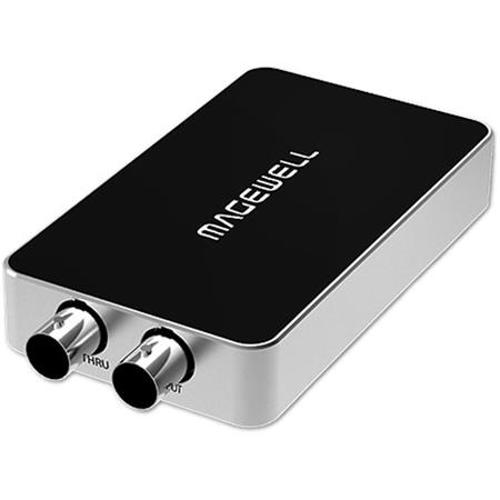
Magewell ewell USB Capture SDI
Magewell : Picture 1 thumbnail Magewell : Picture 2 thumbnail Magewell : Picture 3 thumbnail

RENT Magewell USB Capture SDI

SKU: R-~MAGESDI

First Day ?
Daily
Price
3-Day Wknd
Price
Weekly
Price
$40 $40 $120
$40.00

Set your Rental Period to see your cost.

Your cost for

Replacement Value: $277.76 ?

We require insurance or a major credit card to hold the replacement value of the equipment you are renting

Not available for your selected rental period.

Call us at 212.627.8487 to discuss availability
Call to rent
customer service representative icon

Questions?

If you need assistance or have any questions at all, we’re ready to help.

This Kit Includes

  • Magewell One Channel USB 3.0 to SDI Video Capture Dongle
  • Comprehensive Premium 6' A Male to A Male USB 3.0 Cable
  • USB C to USB Adapter
customer service representative

Questions?

customer service representative icon

For more information on this item, questions about rates, special requests, or if you need any assistance, we’re here for you.

Call 212.627.8487

Email rent@adorama.com

Submit a Request Form

RENT Magewell USB Capture SDI Features

USB Capture Utility V3
Utility V3 is a free software for USB Capture and USB Capture Plus devices. Users can easily check and set the capture-relatedparameters, upgrade the firmware by themselves and export info needed for technical support with the help of the Utility.

Capture Format Setting
Set the capture resolution, frame rate and color space. If the capture format is different with the input format, the FPGA in the capture device will automatically do up/down scaling, causing 0 CPU usage. This functionis especially useful when scaling by software causes much CPU burden.

Audio Volume Control
The Utility V3 can control the volume of the audio input (recording) and output (playback) of the USB capture (Plus) devices. The functions differ with models. If the system volume is changed, the parameter on the Utility V3 will also change accordingly. Users canclick on the icon to quickly mute/unmute a playback/recording device.

Mirror and Flip
This function can reverse the captured image horizontally or vertically, making sure the viewer see the image in the right direction. Eg. When users use Facetime, they can easily mirror the image with the Utility V3.

EDID Editing and Importing
Users can edit and load the EDID of the capture device to support a specific input format, which is not supported by default. Eg. USB Capture HDMI 4K Plus will be able to input at 2560x1440p144 with this function.

Firmware Update
When Internet access is available, Utility V3 automatically checks the firmware version of the capture device and the latest version on the Magewell server. When a higher version is available, Utility V3 will remind users of the update. Users can check the release notes and decide whether they need to update the firmware or not depending on their needs.

Export Diagnose Report
When asking for technical support, users don't need to manually gather device information. Just one click and the Utility V3 will export most of the technical information required by theMagewell support team.

Other Functions
Utility V3 also provide functions such as cropping, deinterlacing, device name setting, aspect ratio conversion, timing adjustment, status image setting, etc.

RENT Magewell USB Capture SDI Specifications

Supported OS
Windows 7/8/8.1/10/2008/2008 R2/2012 (x86 & x64)
Linux (Ubuntu 12.04-16.10, CentOS 7)
OS X 10.9-10.11
macOS 10.12
Chrome OS
Supported APIs
Windows:
DirectShow
Wave API/DirectSound/WASAPI

Linux:
V4L2
ALSA

OS X/macOS:
QuickTime
AV Foundation
Supported Software
VLC
VirtualDub
OBS
XSplit
vMix
VidBlaster
Wirecast
Microsoft Media Encoder
Adobe Flash Media Encoder
Any other DirectShow, V4L2, QuickTime,AV Foundation based encoding or streaming software
Input Interfaces
BNC: SD/HD/3G SDI
3.5mm audio jack: Unbalanced Line In interface
Host Interfaces
USB 3.0:
compatible with USB 2.0
compatible with USB 3.1 Gen 1
Output Interfaces
3.5mm audio jack: Unbalanced Line Out interface
Loop-through Interface
BNC: SDI loop-through interface
Input Functions
Support for up to 2048x1080 input resolution
SDI Specific Functions
Integrated cable equalizer supporting cable lengths up to 140M for 3G-SDI signals
Support for SD/HD/3Ga/3Gb/3Ga-DL/3Gb-DS standards
Support for 2K (2048x1080) mode
Support for RGB 4:4:4, YCbCr 4:4:4, YCbCr 4:2:2 color sampling
Support for 10/12-bit color depth
Support for extraction of SMPTE 352 payload identifier
Support for up to 2 (mono) audio channels at 48KHz
SDI Specific Functions (Cont)
Support for extraction of audio formation information & channel status data
Limited support of 3Gb-DS: only the first stream can be captured
Limited support for capture of the first link of dual link interfaces:
YCbCr 4:2:2 10-bit 1080p 50/59.94/60: captured as 1080i 50/59.94/60
YCbCr 4:4:4 10-bit: captured as 4:2:2
RGB 4:4:4: R/B sub-sampled
Analog Audio Functions
Extract the embedded SDI audio and output via 3.5mm unbalanced Line out
Capture analog audio via 3.5 mm unbalanced Line In interface
Video Capture format
Support for capture resolutions up to 2048x1080
Support for capture frame rates up to 120fps (Actual capture frame rate can be limited by the USBbandwidth and internal working frequency. Typical capture frame rates on the Intel USB 3.0 controller are as follows) - 1920x1080 YUY2 (up to 70fps) and 1920x1080 RGB24 (up to 60fps)
Support for YUY2 & UYVY4:2:2 8-bit
Support for RGB24 & RGB32 4:4:4 8-bit
Video Capture format (Cont)
The default capture format is YUY2. More capture format can be set using USB Capture Utility
Video Processing Functions
Video processing pipelines with 160 Mpixels/s processing bandwidth
Video cropping
Video scaling
Video frame rate conversion
Vertical flip and mirror

Video aspect ratio conversion:
Auto or manual selection of input aspect ratio
Auto or manual selection of capture aspect ratio
Three aspect ratio conversion modes: Ignore (Anamorphic), Cropping or Padding (Letterbox or Pillarbox)
Video Processing Functions (Cont)
Video de-interlacing:
Weave
Blend top & bottom field
Top field only
Bottom field only

Video color format conversion:
Auto or manual selection of input color format & quantization range
Auto or manual selection of capture color format, quantization range & saturation range
Support for RGB, YCbCr 601, YCbCr 709 color formats
Support for Limited or Full quantization range
Support for Limited, Full & 'Extended gamut' saturation range
Multiple devices on one computer
Support for connecting multiple USB devices to one system
Support for setting the device serial number as the device name shown in the system using USB Capture Utility
SDK
The USB Capture SDK provide functions including signal status extraction, capture configuration, etc.
Firmware Upgrade
Multiple devices in one system can be upgraded simultaneously
LED Indicator
Status LEDs indicate the working state of each channel: idle, input signal locked, memory failed or FPGA configuration failed.
Power Consumption
5V max current: Approx. 0.5 A
max power consumption Approx. 2.5 W
Operating temperature
0 to 50 deg. C (32 to 122 deg. F)
Storage temperature
-20 to 70 deg. C (-4 to 158 deg. F)
Relative Humidity
5% to 90% non-condensing
Dimensions (LxWxH)
4.36 x 2.24 x 0.67" (110.7 x 56.8 x 17mm)