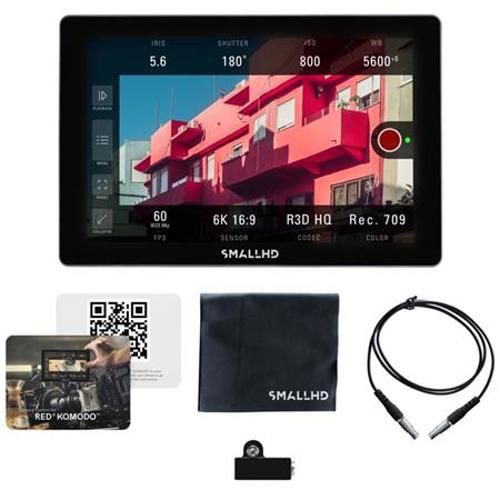
RENT SmallHD Cine 7 LCD Minitor with Camera Control for RED KOMODO/DSMC3 Features
- Cine 7 Smart Monitor - Cine 7 is the ultimate 7" on-camera monitor for cinematographers, offering a color accurate wide-gamut display, cinema camera control, as well as Teradek RT and Bolt 4K integration. Unlock access to KOMODO with the included software license for Cine 7 monitors, and tap into the internal camera settings with intuitive touchscreen configuration tools.
OS 4 Software Toolset User page presets, Focus Assist, frame guides, 4K HDR (PQ) waveforms, improved false color, Color Pipe log conversion,Teradek RT Overlays, and more. Monitor camera metadata, lens control,timecode, and start/stop flags.
- Camera Control Kit - This kit comes with Camera Control for KOMODO (software license), KOMODO Control Cable (5-pin to 9-pin Connector), and a USB Adapter (Micro USB to 5-pin Connector). Unlock access to all camera features available thru RED Camera Protocol (RCP2) on your Cine 7, 702 Touch, or Indie 7 with the included software activation instructions, and tap into the internal camera settings with intuitive touchscreen configuration tools.
- Micro USB to 5-pin Lemo Adapter - Quickly attach a Teradek RT controller to your SmallHD monitor using this convenient USB to 5-pin Lemo adapter. Micro USB to 5-pin LemoAdapter for connecting a Teradek RT controller to your SmallHD monitor. Also used for installing Camera Control for RED & KOMODO to Cine 7, 702 Touch, Indie 7 monitors.
- Camera Control Cable for RED KOMODO - Access internal camera settings via RED KOMODO Camera Control software installation (not included). RED KOMODO Control Cable (Cable ONLY)
Camera Control Cable (5-pin to 9-pin ) Only. Compatible with Focus Pro monitors, for access to RED KOMODO.
- Camera Control for RED KOMODO (Software Only) - This Software License is a digital download and will be emailed to you after purchase. Compatible with Focus Pro, Cine 7, and 702 Touch monitors, for access to RED KOMODO. Unlock access to all camera features available thru RED Camera Protocol (RCP2) with a software activation code, and tap into the internal camera settings with intuitive touchscreen configuration tools.