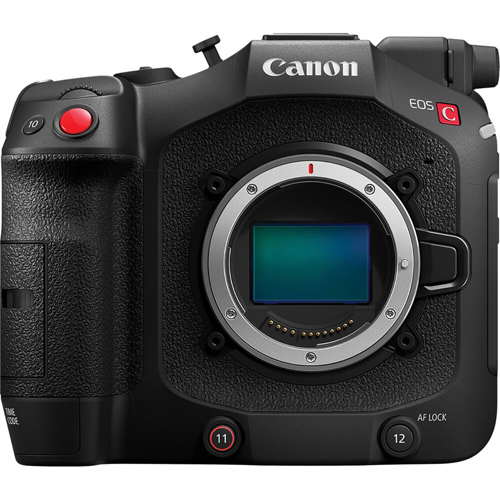

Canon Canon EOS C80 6K Full-Frame Cinema Camera Kit
Canon : Picture 1 thumbnail Canon : Picture 2 thumbnail Canon : Picture 3 thumbnail Canon : Picture 4 thumbnail Canon : Picture 5 thumbnail

RENT Canon EOS C80 6K Full-Frame Cinema Camera Kit

SKU: ~CAC80RF

First Day ?
Daily
Price
3-Day Wknd
Price
Weekly
Price
$225 $225 $675
$225.00

Set your Rental Period to see your cost.

Your cost for

Replacement Value: $7,083.00 ?

We require insurance or a major credit card to hold the replacement value of the equipment you are renting

Not available for your selected rental period.

Call us at 212.627.8487 to discuss availability
Call to rent
customer service representative icon

Questions?

If you need assistance or have any questions at all, we’re ready to help.

This Kit Includes

  • Canon EOS C80 6K Full-Frame Cinema Camera
  • Canon C80 Handle Unit
  • CA-CP300 B Compact Power Adapter for EOS C400 Camera
  • (2) x Angelbird AV Pro UHS-II V90 128GB SDXC Memory Card
  • Lexar Professional USB 3.0 Dual-Slot Reader
  • LaCie USB 3.0 Type A Male to Type Micro B Male Cable
  • (2) x AC Cord for Most Chargers (2-Pin)
  • Canon Mount Adapter EF-EOS R
  • (2) x Canon BP-A60 Battery Pack for EOS C300 MK II and C200
  • (2) x Audio Cable 3-Pin Mini XLR Male to 3-Pin
customer service representative

Questions?

customer service representative icon

For more information on this item, questions about rates, special requests, or if you need any assistance, we’re here for you.

Call 212.627.8487

Email rent@adorama.com

Submit a Request Form

RENT Canon EOS C80 6K Full-Frame Cinema Camera Kit Features

The EOS C80 camera is designed for limitless creative vision. The compact, full-featured camera body includes Canon's 6K full frame Back-Illuminated Stacked CMOS sensor, Cinema RAW Light and 4K/120p internal recording, Canon's next-generation Dual Pixel CMOS AF II and a 12G-SDI interface. The EOS C80 seamlessly integrates into almost any production providing the ultimate flexibility and outstanding image quality.

6K Full Frame Back-illuminated Stacked CMOS Sensor
The EOS C80 features a 6K back-illuminated stacked full-frame CMOS sensor. The sensor offers exceptional low noise, enabling the camera to excel in a wide variety of lighting situations and maximizing the camera's full dynamic range. The new sensor delivers faster read-out speeds than previous EOS sensors and when compared to a front-illuminated CMOS sensor, the new sensor's architecture provides improved sensitivity as it increases light capturing efficiency and improves 4K image quality with 6K oversampling.

Triple Base ISO (800, 3200 and 12,800)
Our newly developed, full frame 6K back-illuminated stacked sensor offers triple-base ISO, which allows the EOS C80 to deliver stunning imagery in a wide range of lighting conditions. With base ISOs of 800, 3200, and 12,800, you will be able to maximize the full dynamic range of the sensor in brilliantly lit or low-light shooting conditions.

Internal Recording: 6K 30P Cinema RAW Light, XF-AVC, XF-HEVC S and XF-AVC S

The EOS C80 can record up to 6K 30P in Cinema RAW Light.
Other recording options include our standard XF-AVC codec which can record in 10-bit 4:2:2 with oversampling from the 6K sensor, creating rich detail and smooth imagery, at frame rates up to 120P, without the need for cropping the image from the sensor. For slow or fast motion recording, the C80 can support up to 4K 120P and 2K 180.

Two additional recording codecs are now available: XF-AVC S and XF-HEVC S. These formats feature an easy-to-manage naming system and folder structure, while recording in the familiar MP4 format and preserving metadata.

High-frame Rate Recording With Auto Focus and Subject Detection
When recording in slow and fast motion (Slow & Fast, 4:2:2 10-bit), the EOS C80 enables Dual Pixel AF II for frame rates of 100 and 120fps and Subject Detection for frame rates between 72-120fps.

Dual SD Card Slots
The EOS C80 features two SD Card slots supporting simultaneous recording and a variety of recording modes, such as simultaneous recording for backup or proxy files for editing, simultaneous recording of different formats and resolutions, and relay recording, which is critical for lengthy video shoots. The slots are compatible with SD UHS-II, V90-class cards.

Dual Pixel CMOS AF II
The EOS C80 supports the next generation of Canon's acclaimed Dual Pixel CMOS Autofocus, Dual Pixel CMOS AF II. The camera's back-illuminated stacked sensor provides better light-capturing efficiency, widening the area of the sensor that can be used for AF.

EOS iTR AF X (People Detection)
With outstanding speed, precision, and a wide autofocus range, Dual Pixel CMOS AF II uses the EOSIntelligent Tracking and Recognition (iTR AF X) algorithm, developed with deeplearning technology, to enable high-performance detection of human beings. In addition to human eyes, face, and head, the camera can detect a human body and follow it with high accuracy.

EOS iTR AF X (Animal Detection)
iTR AF X Animal Detection detects the eyes, face, or the entire body of an animal to enable highly accurate focusing and tracking not affected by subject size or face orientation.

12G-SDI and a Variety of Interfaces
The EOS C80 has diverse set of interfaces making it a versatile camera for variety of productions.

The EOS C80 distinguishes itself from its predecessor with built-in SDI (1x 12-G/3-G SDI OUT, BNC terminals), which enable uncompressed video signal transfer with a secure cable connection.

Other interfaces include: two three-pin mini-XLR audio inputs (INPUT 1 and INPUT 2), a Microphone terminal (3.5mm stereo mini-jack), and REMOTE terminal (2.5mm stereo mini-mini), a full-size HDMI interface (HDMI OUT, Type A Terminal).

Ethernet, and Wi-Fi Control
The built-in Ethernet port and Wi-Fi enable Canon's IP-based remote control XC Protocol. XC Protocol maximizes operability and remote control of camera settings. Using the XC Protocol, the camera can be operated by Canon's RC-IP1000 and RC-IP100 controllers (sold separately), and XC Protocol-enabled third-party remote control panels (RCP) can remotely shade the camera.

Additionally, Canon's Remote Control Camera Application (RCCA) can control camera settings as well as multiple cameras. The camera also features SRT protocol, enabling IP streaming of video and audio.

Built-in ND Filters, Improved Body Design, Compact and Lightweight
The EOS C80's compact mechanical ND filter assembly is specifically designed for the RF mount's short flange back. Buttons for direct control of ND filters are located on the right-hand side of the camera.

The EOS C80 provides up to ten stops of ND filtration, allowing users to shoot in various lighting conditions. The use of ND filters allows a camera operator to adjust exposure while maintaining the depth of field.

The RF mount's short flange back allows the EOS C80's body to be small and lightweight, making the camera just as comfortable on a drone or a gimbal as it is on your shoulder, a tripod, or any configuration where compact size and light weight are important.

The camera also has an ergonomic design with a new, lightweight handle assembly, and the Multi-function Shoe is located just above the LCD screen.

Adding to the versatility of this camera, a new quarter-inch baseplate mounting hole under the front of the EOS C80 will add even more options for securing and positioning the camera in a variety of shooting situations.

Mount Adapter PL-RF with Cooke/iCompatibility
The Mount Adapter PL-RF, new to the RF ecosystem, unlocks a broad assortment of PL mount lenses for Canon's RF cameras. The adapter is compatible with Cooke/i Technology's metadata protocol and includes lock plates to ensure a secure lens mount.

Auto Clear Scan Mode
The Auto Clear Scan setting available in the C80, is an automatic shutter mode setting that can detect the frequency of light sources between 50.0 Hz to 2011.2 Hz to help reduce or virtually eliminate the flickering in some LED walls.

Canon Multi-Camera Control App
The EOS C80 is compatible with the Canon Multi-Camera Control App for iPhone.

This app empowers camera operators to have control over recording start and stop, focus, zoom and iris, ND Filters, ISO, Shutter, White Balance, Custom Picture and more, all while viewing the image from the camera.

The C80's built-in Ethernet and Wi-Fi connectivity enables centralized control via the Remote Camera Control Application (RCCA). RCCA provides simultaneous camera control for up to nine cameras with video - achieving a "multi-camera operation".

At a video production or broadcasting site, an operator can select a camera from the videos displayed on the "Connected Camera List", within the application and operate it from the "Camera Control Area" in the control panel of the software. The software is included and can be installed immediately without having to prepare a hardware controller in advance making it easy to use for the operator while creating an effective one-person operation.

Lens-RelatedJump to...

Lens Mount
Canon RF mount
Lens
RF lens(including RF-S lens, RF cinema lens), EF lens (including EF lens, EF cinema lens (when equipped the RF-EF mount Adapter, sold separately) PL lens (when equipped the Mount Adapter PL-RF, sold separately)
Supports /i Technology
Cooke Communication Protocol: Only when equipped with Mount Adapter PL-RF.

Video Display UnitJump to...

Type
Color wide LCD monitor
Screen Size
3.5 inch (diagonal 8.8 cm)
Number of Dots
Approx. 2.76 million dots (1280xRGBx720)
Field of View Coverage
100%
Adjustment Function
Brightness, Contrast, Color, Sharpness, Luminance
Touch Panel
Electrostatic capacitance system. Touch/drag operation supported.

SensorJump to...

Sensor
Full-Frame back-illuminated stacked CMOS sensor
Sensor Modes
Full-Frame, Super 35mm (Crop)
Total Pixels
Approx. 26.67 megapixels (6202x4300)
Number of Effective Pixels
Sensor mode: Full frame:
Approx. 1904.5 MP (6008x3170): When 6000x3164 / 4096x2160 / 2048x1080 is selected as the resolution
Approx. 1786.0 MP (5634x3170): When 3840x2160 / 1920x1080 is selected as the resolution
Sensor mode: Super 35mm (Crop):
Approx. 1010.9 MP (4376x2310): When 4368x2304 / 4096x2160 / 2048x1080 is selected as the resolution
Approx. 948.0 MP (4104x2310) : When 3840x2160 / 1920x1080 is selected as the resolution
Unit Pixel
6.0 x 6.0 (microm)
Effective Screen Size
Sensor mode: Full-Frame
36.0 x 19.0mm (40.7mm on the diagonal)
When 6000x3164 / 4096x2160 / 2048x1080 is selected as the resolution

33.8 x 19.0mm (38.7mm on the diagonal)
When 3840x2160 / 1920x1080 is selected as the resolution
Effective Screen Size (Contd.)
Sensor mode: Super 35mm (Crop)
26.2 x 13.8mm (29.6mm on the diagonal)
When 4368x2304 / 4096x2160 / 2048x1080 is selected as the resolution

24.6 x 13.8mm (28.2mm on the diagonal)
When 3840x2160 / 1920x1080 is selected as the resolution
Filter
RGB primary color filter (Bayer array)
S/N
Both are measured values of output signals. The measurement method is based on ARIB TR-B45.
- 59.94 Hz mode: 67 dB (Typical)

Full frame: 3840x2160 / 29.97P, BT.709 Standard Base Sensitivity ISO 160 (Dynamic range 300%)
- 50.00 Hz mode: 67 dB (Typical)

Full frame: 3840x2160 / 25.00P, BT.709 Standard Base Sensitivity ISO 160 (Dynamic range 300%)
Dynamic Range
Canon Log 2: 1600% / 16 stops (at Base Sensitivity ISO 800)
Canon Log 3: 1600% / 14 stops (at Base Sensitivity ISO 800)
Sensitivity
59.94 Hz: f/10 (59.94P) / f/14 (29.97P)
50.00 Hz: f/11 (50.00P) / f/16 (25.00P)
All values for ISO 800,2000 lux, and reflectance rate of 89.9%. Some lens specifications may not enable these f-numbers.
Main Rec Format
Full-Frame:
RAW: XF-AVC, XF-AVC S, XF-HEVC S

Super 35mm (Crop):
RAW: XF-AVC, XF-AVC S, XF-HEVC S
Main Resolution
Full-Frame:
6000x3164
4096x2160, 3840x2160, 2048x1080, 1920x1080

Super 35mm (Crop):
4368x2304
4096x2160, 3840x2160, 2048x1080, 1920x1080
Video Format
RAW
XF-AVC
XF-AVC S
XF- HEVC S
Recording/Video Compression Format
RAW: Cinema RAW Light (Canon original)
XF-AVC: MPEG-4 AVC/H.264
XF-AVC S: MPEG-4 AVC/H.264
XF- HEVC S: HEVC/H.265
Audio
RAW/XF-AVC: Linear PCM (24 bit 48kHz) 4 channels

XF-AVC S/XF- HEVC S: MPEG2-AAC LC (16 bit 48kHz) 2 channels
Linear PCM (24 bit 48kHz) 4 channels

Photo RecordingJump to...

Sensor Mode
Full-Frame

RAW:
Photo Resolution: 4096x2160

XF-AVC, XF-AVC S / XF-HEVC S:
Main Resolution: 4096x2160, 2048x1080, 3840x2160, 1920x1080
Photo Resolution: 4096x2160, 3840x2160

Super 35mm (Crop)

RAW:
Photo Resolution: 4096x2160

XF-AVC, XF-AVC S / XF-HEVC S:
Main Resolution: 4096x2160, 2048x1080, 3840x2160, 1920x1080
Photo Resolution: 4096x2160, 3840x2160
Recording data
SD Card

Media - SD CardJump to...

Number of slots
2
Type
SD, SDHC, SDXC
Speed class
Speed class: C6, C10 UHS speed class: U1,U3 Video speed class: V30, V60, V90
File system
SD card (2GB) : FAT12,16
SDHC card (up to 32GB): FAT32
SDXC card (32GB to 2TB): exFAT File division units: FAT32 is 4GB, exFAT is none Maximum of 999 file divisions per clip (FAT32 only)
Maximum number of clips per media
999
Other
In addition to proxy recording and photos, recording of custom pictures, metadata, and menus, etc., is also possible

Slow and Fast Motion RecordingJump to...

Slow and Fast Motion Recording
Frame rate: Available frame rate for Slow & Fast Motion Recording:
59.94P: 1, 2, 3, 6, 15, 30, 44, 48, 52, 56, 60, 90, 120, 150, 180
29.97P: 1, 2, 3, 6, 15, 22, 24, 26, 28, 30, 32, 36, 40, 44, 48, 52, 56, 60, 90, 120, 150, 180
50.00P: 1, 5, 15, 25, 34, 38, 42, 46, 50, 54, 58, 60, 75, 100, 120, 125, 150, 175, 180
25.00P: 1, 5, 15, 17, 19, 21, 23, 25, 26, 28, 30, 34, 38, 42, 46, 50, 54, 58, 60, 75, 100, 120, 125, 150, 175, 180
Slow and Fast Motion Recording (Contd.)
23.98P, 24.00P: 1, 2, 3, 6, 12, 16, 18, 20, 22, 24, 26, 28, 30, 32, 36, 40, 44, 48, 52, 56, 60, 72, 96, 120, 144, 168, 180
Exposure control
Exposure control methods are as follows
Manual: Manual setting using shutter, iris, ISO/Gain, and ND filter
Push Auto Iris: While the Push Auto Iris button is pressed, the aperture is controlled to achieve proper exposure. If deviation from the proper exposure occurs, it takes control again
Auto Iris: Constantly adjusts automatically for proper exposure using iris
Exposure control (Contd.)
Auto ISO/Gain: Constantly adjusts automatically for proper exposure using ISO/Gain
Other: AE Response can be changed in the menu
Auto ISO/Gain can be used in combination with Auto Iris or Push Auto Iris
Metering system
Standard (center-weighted metering)
Spotlight
Backlight
Exposure compensation
An AE shift function is provided. The target value ( +/-8 steps from center) for the brightness can be set
The values are indicated as exposure values (EV)
Correction can be set in 0.25 increments from +/-0 to +/-2.0
Shutter setting: Off, Speed, Angle, Clear Scan, or Slow can be selected as the display format
Auto Clear Scan Setting
When flicker occurs while shooting under a light source with highspeed flickering, (Auto Clear Scan Setting) can be used to detect the frequency of light sources within the range of 50.0 Hz to 2011.2 Hz, display the shutter speed according to the flicker speed, and allows shooting with minimized flicker.
Auto Clear Scan Setting (Contd.)
Detection accuracy may decrease under the following conditions:
Repeating patterns (e.g.: lattice/grid patterns, striped patterns, etc.)
A moving subject that does not stay still
Extreme brightness or darkness
Multiple light sources on the screen
The flickering comes from a small light source
Low subject illuminance
Iris Settings
Iris settings function is provided for RF lens, RF Cinema lens, EF lens, EF Cinema lens and PL lens. 1/2 stop, 1/3 stop, or fine display can be selected. Which numerical values can be displayed depends on the lens specifications.
Fine: The smallest iris increment allowed by the lens attached
Iris Settings (Contd.)
Step 1/2: 0.7 / 0.8 / 1.0 / 1.2 / 1.4 / 1.8 / 2.0 / 2.5 / 2.8 / 3.5 / 4.0/ 4.5 / 5.6 / 6.7 / 8.0 / 9.5 / 11 / 13 / 16 / 19 / 22 / 27 / 32 / 38 / 45 / 54 / 64 / 76 / 91 / closed
Step 1/3: 0.7 / 0.8 / 0.9 / 1.0 / 1.1 / 1.2 / 1.4 / 1.6 / 1.8 / 2.0 / 2.2 / 2.5 / 2.8 / 3.2 / 3.5 / 4.0 / 4.5 / 5.0 / 5.6 / 6.3 / 7.1/ 8.0 / 9.0 / 10 / 11 / 13 / 14 / 16 / 18 / 20 / 22 / 25 / 29 / 32 / 36 / 40 / 45 / 51 / 57 / 64 / 72 / 81 / 91 / closed
Zoom-linked f No. Compensation
When using a lens whose f-number changes as zooming is performed, select (On) on the menu for exercising control to change the iris diameter so that the f-number will be kept constant in tandem with the zooming; alternatively, select (Off) for not exercising this control. When (On) is selected, the f-number remains constant, but the iris drive will make a sound, and the sound of this operation may be recorded.
Zoom-linked f No. Compensation (Contd.)
Also, luminance may change due to the iris drive. When (Off) is selected, the f-number changes as zooming is performed, but there is no sound of the iris operation, and neither is the luminance changed by the iris drive.
ISO Sensitivity 1 stop display
Base ISO automatic switching: 100, 160, 200, 400, 800, 1600, 3200, 6400, 12800, 25600, 51200, 102400
Base ISO 160, Base ISO 400, Base ISO 800: 100, 160, 200, 400, 800, 1600, 3200, 6400, 12800
Base ISO 640, Base ISO 1600, Base ISO 3200: 400, 640, 800, 1600, 3200, 6400, 12800, 25600, 51200
Base ISO2500, Base ISO6400, Base ISO12800: 1600, 2500, 3200, 6400, 12800, 25600, 51200, 102400
ISO Sensitivity 1 stop display (Contd.)
Base ISO automatic switching: 100, 125, 160, 200, 250, 320, 400, 500, 640, 800, 1000, 1250, 1600, 2000, 2500, 3200, 4000, 5000, 6400, 8000, 10000, 12800, 16000, 20000, 25600, 32000, 40000, 51200, 64000, 80000, 102400
Base ISO 160/400/800: 100, 125, 160, 200, 250, 320, 400, 500, 640, 800, 1000, 1250, 1600, 2000, 2500, 3200, 4000, 5000, 6400, 8000, 10000, 12800
ISO Sensitivity 1 stop display (Contd..)
Base ISO 640/1600/3200: 400, 500, 640, 800, 1000, 1250, 1600, 2000, 2500, 3200, 4000, 5000, 6400, 8000, 10000, 12800, 16000, 20000, 25600, 32000, 40000, 51200
Base ISO2500/6400/12800: 1600, 2000, 2500, 3200, 4000, 5000, 6400, 8000, 10000, 12800, 16000, 20000, 25600, 32000, 40000, 51200, 64000, 80000, 102400
Gain (dB) Normal
Base ISO automatic switching: -6 dB, -3 dB, -2 dB to 42 dB, 45 dB, 48 dB, 51 dB, 54 dB
Base ISO 160/400/640/800/1600/3200: -6 dB, -3 dB, -2 dB to 30 dB, 33 dB, 36 dB
Base ISO 2500/6400/12800: -6 dB, -3 dB, -2 dB to 18 dB, 21 dB, 24 dB, 27 dB, 30 dB
Fine
Base ISO automatic switching:
(ISO/Gain Extended Range) is (On): Between -2dB to 54dB, can be set in 0.5dB increments
(ISO/Gain Extended Range) is (Off): Between -2dB to 42dB, can be set in 0.5dB increments

Base ISO 160/400/640/800/1600/3200:
(ISO/Gain Extended Range) is (On): Between -2dB to 36dB, can be set in 0.5dB increments
(ISO/Gain Extended Range) is (Off): Between -2dB to 30dB, can be set in 0.5dB increments
Fine (Contd.)
Base ISO 2500/6400/12800:
(ISO/Gain Extended Range) is (On): Between -2 dB to 30 dB, can be set in 0.5 dB increments
(ISO/Gain Extended Range) is (Off): Between -2 dB to 18 dB, can be set in 0.5 dB increments

Image QualityJump to...

Daylight
5600 K (Initial value: 5600 K / +/-0 CC)
Adjustable range: 4300 K - 8000 K / -5 CC - +5 CC
Tungsten
3200 K (Initial value: 3200 K / +/-0 CC)
Adjustable range: 2700K - 3700K / -5 CC - +5 CC
Color Temperature Setting
Adjustable range: 2000 K - 15000 K / -20 CC - +20 CC Initial value: 5600 K / +/-0 CC
Set A/Set B
Both adjustable range and initial values are same as Kelvin settings.
WB Adjustment Resolution
Color temperature direction K: 5-mired (1 Mired=106/Kelvin) or 100 K increments. UV direction CC: 1 CC increments
Others
Includes a function for smooth transitions when white balance is changed (sockless white balance). The response during AWB can be selected. (AWB Response) AWB operation can be paused when activated. (AWB Hold) It is allocated to one of the assignable buttons. The color temperature increment can be set to (Mired) (5-mired increments) or (Kelvin) (100-Kelvin increments). If mired is selected, the value is converted to Kelvin for display
Focusing Systems
Dual Pixel CMOS AF
CMOS AF detection range
When detecting the entire area and subject, approx. 100% (Vertical) x approx. 100% (Horizontal). Otherwise approx. 100% (Vertical) x approx. 90% (Horizontal)
May be approx. 100% (V) x approx. 80% (H, approx. 75% (V) x approx. 40% (H) depending on the lens
AF Modes
Modes available are (Continuous AF) and (One-Shot AF). All of these modes enabled by switching the AF/MF switch of the RF lens to AF.
Continuous AF: Used to keep continuously focused on a subject
One-Shot AF: AF is performed only while the One-Shot AF button to which it has been assigned is held down. No further lens movement is permitted after focusing.
AF Modes (Contd.)
When (Lens action if cannot AF) is set to (Stop) in Continuous AF mode, stop the search when distance measurement is not possible.
AF Frame Size
Small Zone: Video display range approx. 15.9% (Vertical) x 11.8% (Horizontal)
Zone: Video display range approx. 43% (Vertical) x 25% (Horizontal) Large Zone (Horizontal): Video display range approx. 43% (Vertical) x 76% (Horizontal)
Large Zone (Vertical): Video display range approx. 97% (Vertical) x 25% (Horizontal)
Full: approx. 100% (Vertical) x approx. 100% (Horizontal)
AF Frame Movement
Available. The frame can be moved to any position by operating the joystick.
AF Lock
Available.
AF Speed
The AF speed (10 steps) and AF response (7 steps) can be changed.
Subject Detection AF
The subject detection function automatically detects the face/head, eyes or body of a person or animal, according to the menu settings. iWhen using autofocus, if (Subject to detect) is set to (People), a white frame will be displayed around the main subject of the detected people (and a gray frame will be displayed for other subjects), however when it is set to (Animals)
Subject Detection AF (Contd.)
A white frame will be displayed only around the main subject of the detected animals or people.
Tracking AF
The main subject can be selected and tracked with the joystick or the touch panel. This function needs to be assigned to the assign button. It is also possible to perform AF on the subject being tracked.
Subject Tracking After Focus Operation
A function that automatically performs AF tracking on the focused subject after the focus is manually shifted to the de- sired subject. If there is no focused subject, AF tracking will not be performed, and AF will be performed on an automati- cally chosen subject. The tracking frame (orange) can also be displayed.
Eye Detection
When Eye Detection is ON, a detection frame is displayed over eyes for both people and animals when any eyes have been detected.
Audio Input Selection (CH1/CH2 Input)
This selects the input terminal to be recorded on CH1/CH2. The choices are INPUT terminal, MIC terminal, Monaural mic and Multi-Function Shoe (When compatible multi-accessory shoes equipped).
CH2 Input
This selects the input terminal to be recorded on CH2. The choices are INPUT 2, INPUT 1, MIC terminal and Monaural mic.
Audio Input Selection (CH3/CH4 Input)
This selects the input terminal to be recorded on CH3/CH4. The choices are INPUT terminal, MIC terminal, Monaural mic and Multi-Function Shoe (When compatible multi-accessory shoes equipped).
CH1/CH2 (CH3/CH4) ALC Link
Selects whether to link the two channels for audio recording levels input to CH1/CH2 (CH3/CH4) or operate separately.
Audio Rec Level CH3 (CH4, CH3/CH4)
Select Auto or Manual for the audio levels recorded to CH3/CH4 (CH4, CH3/CH4) . If you choose Manual, you can adjust the level from 0 to 100.
INPUT (1 / 2) Mic Trimming
This function is used to set the sensitivity of the mic input of INPUT (1 / 2). -12 dB, -6 dB, 0 dB, +6 dB, or +12 dB can be selected.
INPUT1 (1 / 2) Mic Att.
Function used to attenuate the INPUT 1 / 2 connector mic input by 20 dB.
NPUT1 (1 / 2) Mic Low Cut
Inserts a low-cut filter into the audio input to the INPUT (1/2) mic input. There is a mode for recording mainly human voices, and a mode for reducing the effect of the "banging" sound of the wind when shooting in a windy place such as near a beach or a building, or outdoors which is always affected by the wind.
INPUT Reference Level
Switches the reference level of the INPUT terminal between -18dB and -20dB.
INPUT Limiter
This function prevents signal distortion from high-level manual signal input to INPUT. ON or OFF is selected.
MIC Att.
Function that attenuates the microphone terminal (3.5 mm) input by 20 dB.
MIC Low Cut
This function cuts off the low-frequency components in the mic input signals of the microphone terminal (3.5 mm) same as those of the INPUT1 (1/2) micro cut.
MIC Input
Set the input sensitivity to the MIC terminal and switches the power supply on/off.
When ( MIC (with Power Supply)) is selected: Sensitivity setting is (MIC) and power supply is turned on.
When (LINE"" is selected: Sensitivity setting is (LINE) and power supply is turned off.
Multi-Function Shoe Input
To display a menu corresponding to an accessory connected to a multi- accessory shoe.
Shoe Mic Attenuator
Shoe Mic Low Cut
Shoe Mic Directionality
Subunit (1 / 2) Recording mode
Subunit (1 / 2) Recording Level
Machine (1 / 2) Wind cut
Aircraft (1 / 2) Attenuator
Wireless Mic Mixing
MUTE button
Movie recording button
Tally Lamp
Display Wireless Mic Status
1 kHz Tone
This function is used to output/record a 1 kHz tone during color bar output. -12 dB, -18 dB or -20 dB can be selected as the function's setting.
Headphone Volume
This enables the headphone volume to be set to any level from 1 to 15 (a total of 16 steps including (Off)).
Speaker Volume
This enables the speaker volume to be set to any level from 1 to 15 (a total of 16 steps including (Off)).
Monitor Channels
The allocation for audio output channels to the two headphone output channels (Left/Right). The following selections are available. HDMI OUT and SDI OUT terminals are not supported.
CH1/CH2, CH1/CH1, CH2/CH2, CH1+2/CH1+2, CH3/CH4, CH3/CH3, CH4/CH4, CH3+4/CH3+4, CH1/CH3, CH2/CH4, CH1+3/CH2+4
HDMI OUT Channels
This selects the channels whose signals are to be output to the HDMI OUT terminal. Either (CH1/CH2) or (CH3/CH4) is selected.

Assist FunctionJump to...

Assist Function
Output to LCD monitor, SDI OUT terminal, HDMI OUT terminal
Confirm Focus
Focus Guide: The focus guide gives you an intuitive visual indication of the current focus distance and the direction and amount of adjustment necessary to bring the selected subject into full focus.
Peaking (contour enhancement): With the peaking function, the colors (white, red, blue and yellow) can each be set, and the frequency (edge thickness: 1 to 4) and gain (effect level: 1 to 15) can each be adjusted.
Confirm Focus (Contd.)
Magnification: Screen display can be enlarged by roughly 2x, 5x and 10x by pressing the MAGN. button. It is also possible to move the magnification area by operating the joystick.
Confirm Exposure
False Color Display: A feature which superimposes false colors for output images at specific luminance levels so that the system can visually deter- mine the exposure state. Brightnesses other than those specified below are given achromatic colors.

Colors: Index Displays (Definition)
Red: White clipping
Yellow: Just below white clipping
Pink: One stop over 18% gray
Confirm Exposure (Contd.)
Green: 18% gray
Blue: Just above black clipping
Purple: Black clipping

Zebra:
The high-brightness sections of the subject are displayed on the monitor as a black and white zebra pattern.
Either zebra pattern display in the range (Zebra 1) prescribed by the luminance level or at a level higher than the prescribed level (Zebra 2) is selected. Zebra 1 & 2 can also be selected. For the detailed settings, refer to the menus.
Confirm Signals
Wave Form Monitors (signal level):
Line display
Line + spot: Line display over a red waveform in a red frame
Line select display
RGB (parade) display
YPrPb (parade) display

You can also change the size and set the transparency. For HDR-PQ images, displays the video scope in nits (cd/ sq. m) and the narrow range's (video range) waveform monitor.
Confirm Signals (Contd.)
For HDR-HLG images, the Y axis shows a relative-index value between 0 and 1000 nits.
Vector scope (Intensity or hue of the chrominance signal): Normal/spot display (in the red frame) can be selected. Additionally, output gain can be selected as either 1x or 2x. You can also set the transparenc
Confirm Signals (Contd..)
Color Bar: Displays the reference signal (SMPTE/EBU/ARIB) and adjusts the color and brightness of the TV or external monitor. At the same time, record 1Khz test tone
Confirm Composition,Safety Zone
Center Marker, Horizontal (Vertical) Marker, Grid Marker, Aspect Marker, Safe Area Marker, User Marker User Markers can be set to the desired size and position. A color can be set for each marker.

User Marker: Increased number of settings
Increased setting methods

Size settings: In addition to pixels, added scaling and aspect ratio
Confirm Composition,Safety Zone (Contd.)
Position settings: In addition to central specification, added upper-left specification and central alignment with other markers
Marker display in MEDIA mode

Input/Output TerminalsJump to...

Input Terminals
Mic Terminal:
3.5 mm stereo mini jack (Unbalanced, plugin power supported)

MIC:
Input impedance: 1.5 k Ohm
Sensitivity: -72 dBV (Volume auto, Full scale - 18 dB)
ATT: 20 dB
Supply voltage: DC 2.4 V (Bias resistor 2.2 k Ohm)

LINE:
Input impedance: 10 k Ohm
Sensitivity: -12 dBV (Volume center, Full scale -18 dB)

Remote A Terminal:
2.5 mm stereo mini jack
Input Terminals (Contd.)
INPUT1 Terminal, INPUT2 Terminal:
Mini XLR 3 pin jack (Balanced) (1) Shield, (2) Hot, (3) Cold)

MIC:
Input impedance: 600 Ohm
Sensitivity: -60 dBu (Volume center, Full scale - 18 dB)
ATT: 20 dB

LINE:
Input impedance: 10 k Ohm
Sensitivity: +4 dBu (Volume center, Full scale - 18 dB)
Output Terminals
SDI Out Terminal:
Video: HD: SMPTE 292, 3G: SMPTE 424, SMPTE 425, 6G: SMPTE ST 2081, 12G: SMPTE ST 2082

Audio: SMPTE ST 299-1, SMPTE ST 299-2
Output signal level: 0.8 Vp-p
Output impedance: 75 Ohm

Headphone Terminal:
3.5mm stereo mini jack
Output impedance: 50 Ohm
Output signal level: -17 dBV (32 Ohm load, maximum volume)
Input/Output Terminals
USB Terminal: USB Type-C jack, Super Speed USB (USB3.2 Gen1x1) equivalent, allows connection to smartphones or GP-E2. Supports UVC (USB Video Class)

TIME CODE Terminal:
BNC jack terminal
Input: Input impedance: 100k Ohm, Signal level: 0.5-4.5 Vp-p
Output: Output impedance: 50 Ohm, Signal level: 1.3 Vp-p

Ethernet Terminal: RJ45 Connector (1000BASE-T compatible)
Other Terminals
DC IN 24V Terminal: DC Jack
Multi-Function Shoe Terminal: Canon original specifications

NetworkJump to...

Ethernet
Supported standards: 1000BASE-T
Wi-Fi
Supported standards: IEEE 802.11a/b/g/n/ac
Frequency band: 2.4 GHz, 5 GHz Available channels vary depending on destination
Setup: Infrastructure (WPS: push button method, WPS: PIN code method, searching for Access Points, manual), Camera Access Point
Security: Open, Shared key, WPA/WPA2/WPA3-Personal, WPA/WPA2/WPA3-Enterprise
Encryption methods: WEP-64, WEP-128, TKIP, AES

IP StreamingJump to...

Compression Method
MPEG-4 H.264/AVC
Bit Rate/Resolution
9 Mbps: 1920x1080 (59.94p, 59.94i, 50.00p, 50.00i)
4 Mbps: Same as above
Audio
MPEG-2 ACC-LC 2ch
Audio Rate
256 Kbps
Protocols
UDP: Prioritizes transfer speed, with no guarantees of reliability
RTP: Standard system for sending videos and audio online. Lost or lagging packets ignored
SRT: Achieves high-quality streaming with minimal video distor- tion due to low latency and a packet loss playback function
Protocols (Contd.)
RTP+FEC: Error correction (FEC) control during RTP transfer enables recovery of lost or corrupt packets on the receiving side
RTSP+RTP: Real-time data streaming control via RTSP (Real Time Streaming Protocol) and transfer via RTP. The receiving side can start or stop streaming

Application SoftwareJump to...

Application Software
Cinema RAW Development
Canon RAW Plugin for Avid Media Access
Canon RAW Plugin for Final Cut Pro
Canon XF Utility
Canon XF Plugin for Avid Media Access
MP4 Join Tool
EOS VR Utility
EOS VR Plugin for Adobe Premiere Pro
Canon HEVC Activator
Application Software (Contd.)
Live Link Plugin for Unreal Engine
CV Metadata Plugin for Adobe After Effects
CV Metadata Extraction Tool
Content transfer Professional
Remote Camera control Application
Canon Multi-Camera control

PowerJump to...

Power
Terminal: DC IN 24V terminal: DC 24V (23.7V-25.0V) Battery terminal: DC 14.4 V (battery pack)
Compatible battery: BP-A30N (provided with camera)/BP-A60N BP-A60/BP-A30
Battery Charging
BP-A60N: Approx. 310 min.
BP-A30N: Approx. 175 min.

Temperature & Humidity RequirementsJump to...

Performance
Approx. 32 to 104 Degree F (0 to 40 Degree C), 85% (Relative humidity)
Operation
Approx. 23 to 113 Degree F (-5 to 45 Degree C) , 60% (Relative humidity)

BatteryJump to...

Battery Info
Required, included
Battery Material
Lithium ion
Battery Type
Non-universal
Battery Quantity
1

PhysicalJump to...

Dimensions (W x H x D)
Approx. 6.3 x 5.4 x 4.6" (160 x 138 x 116mm) (Camera body only)
Approx. 6.3 x 10.9 x 6.8" (160 x 276 x 173mm) (Handle unit, Mic holder, Battery BP-A30N)
Weight
Camera body Approx. 2.9 lbs (1.31kg)
Handle Unit: Approx. 5.5 oz (155g)
BP-A30N Battery Pack: Approx. 8.6 oz (243g)
CA-CP300 B Compact Power Adapter: Approx. 7.7 oz (219g)
Battery Charger CG-A20: Approx. 5.1 oz (145g)
Microphone Holder + 2 screws: Approx. 2.1 oz (60g)
Weight (Contd.)
Total weight at the time of shooting:
Camera with BP-A30N battery, 2 cards: Approx. 3.4 lbs (1.54kg)
Camera with handle unit, microphone holder, BP-A30N battery, 2 cards: Approx. 3.9 lbs (1.75kg) (Including tape measure hook and grip belt)