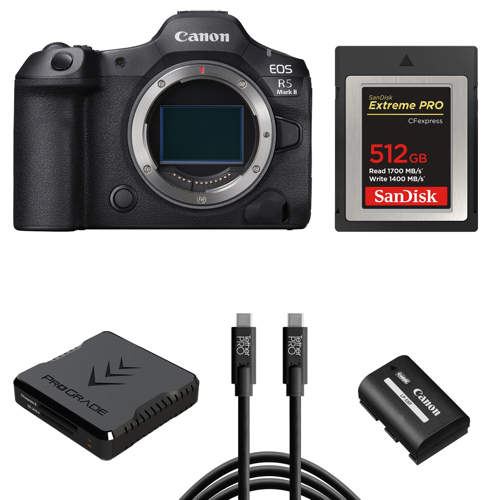
RENT Canon EOS R5 Mark II Mirrorless Camera Kit Features
For photographers and videographers looking to elevate their craft, the Canon EOS R5 Mark II Mirrorless Camera stands as a groundbreaking advancement in the EOS series. As the most powerful EOS 5 series camera to date, it builds upon the versatility of its predecessor, the EOS R5, with a host of innovative features. Central to its performance is the newly developed 45MP back-illuminated and stacked sensor, which delivers incredibly fast read-out speeds. This enables a remarkable 30 fps electronic shutter, perfect for capturing high-speed action with precision and clarity. The sensor's design minimizes rolling shutter distortion, ensuring consistently sharp and clear images.
The EOS R5 Mark II is driven by Canon's cutting-edge DIGIC Accelerator, a front-end processor that manages the camera's advanced features, allowing the DIGIC X processor to concentrate on image processing. This results in unparalleled speed and performance, supporting sophisticated functions like AF detection, exposure metering, eye-control focus, subject identification, and tracking. The camera's autofocus system has been significantly upgraded, featuring subject tracking that maintains focus even when the subject is temporarily obscured. Canon's innovative Eye Control AF technology allows the AF Area to move based on where you look, enhancing focus accuracy.
A standout feature is the new Action priority AF mode, which selects subjects based on movement, making it ideal for capturing dynamic sports scenes such as soccer, volleyball, and basketball. Beyond still photography, the EOS R5 Mark II is a formidable tool for videographers. Its 45MP sensor supports 8K video recording at up to 60 frames per second internally, with a user-friendly menu incorporating Cinema EOS terminology for easier navigation. The camera offers RAW video recording at 8K resolution and an S-RAW setting for 4K RAW video, alongside various MP4-type video options.
Powering these enhancements is the new LP-E6P battery, providing the necessary energy for extended shooting sessions. The camera features a high-resolution 0.5-inch 5.76 million dot OLED EVF, delivering a bright and clear view of your subject. Built to endure challenging conditions, the EOS R5 Mark II boasts dust- and weather-resistant construction, along with dual card slots for CFexpress and UHS-II SD Memory Cards, ensuring ample storage for your creative endeavors.
The camera's improved 5-axis in-body image stabilization system works in harmony with RF lenses featuring built-in IS, offering optimal stabilization for both photos and videos. In summary, the Canon EOS R5 Mark II Mirrorless Camera is a powerhouse of technological advancements, designed to deliver superior image and video quality in any scenario. Whether you're a seasoned professional or an enthusiastic hobbyist, this camera is poised to elevate your creative potential to new heights.
Canon EOS R5 Mark II Mirrorless Camera Kit Specifications
Card 1: CFexpress memory card: Type B: Card slot CFexpress 2.0 and VPG400 supported Up to 2 TB is supported (a card exceeding 2 TB is handled as a card of 2 TB)
Card 2: SDXC/SDHC/SD memory card: Compatible with UHS-II Eye-Fi cards and Multimedia Cards (MMC) not supported
Compatible Lenses
Canon RF lens group (including RF-S lenses) When using Mount Adapter EF-EOS R: Canon EF or EF-S lenses (excluding EF-M lenses)
Canon designed full-frame back-illuminated stacked CMOS sensor (compatible with Dual Pixel CMOS AF)
Effective Pixels
Approx. 45 megapixels
Screen Size
Approx. 36.0 x 24.0mm
Pixel Unit
Approx. 4.40 microm square
Total Pixels
Approx. 50.3 megapixels
Aspect Ratio
3:2 (Horizontal: Vertical)
Color Filter System
RGB primary color filters
Low Pass Filter
Installed in front of the image sensor, non-detachable
Dust Deletion Feature
(1) Self Cleaning Sensor Unit: Removes dust adhering to the low-pass filter At power off only / Enable / Disable. Performed automatically (taking about approx. 2 sec. as indicated on the screen) or manually (taking about approx. 8 sec. as indicated on the screen) After manually activated cleaning, the camera will automatically restart (Power OFF to ON)
Dust Deletion Feature (Contd.)
(2) Dust Delete Data acquisition and appending: The coordinates of the dust adhering to the low-pass filter are detected by a test shot and append-ed to subsequent images The dust coordinate data appended to the image is used by the EOS software to automatically erase the dust spots Not available with RF-S/EF-S lenses. Setting may not be possible depending on the combination of functions
DCF standards compliant. The following folder is created automatically in the DCIM folder. Default: EOSR5
Movies
XF-HEVC S / XF-AVC S format REEL_ A normal movie file (MP4) is saved. REEL_ A RAW movie file (CRM) is saved. In each REEL_
News Metadata
XF-HEVC S / XF-AVC S format News Metadata is saved in the XMLTAG folder in the currently selected card.
NewsML-G2 standard compliant When [Add News Metadata: On] is set, news metadata (XML file) of the movie associated with the set news metadata is generated.
Continuous numbering: The numbering of captured images continues even after you replace the card.
Auto reset: When you replace the card, the numbering will be reset to start from 0001. If the new card already contains images, the numbering will continue from the last recorded image in the card.
Manual Reset
Resets the file number to 0001, and creates a new folder automatically.
Clip Number
Continuous numbering: The numbering of captured clips continues from the last recorded clip even after you replace the card.
Auto reset: When you replace the card, the numbering will be reset to start from 001. If the new card already contains clips, the numbering will continue from the last recorded clip in the card.
Card 1: CFexpress memory card Type B: Card slot CFexpress 2.0 and VPG400 supported Up to 2 TB is supported (a card exceeding 2 TB is handled as a card of 2 TB).
Card 2: SDXC/SDHC/SD memory card Compatible with UHS-II Eye-Fi cards and Multimedia Cards (MMC) not supported
Card Access Indicator
Access lamp lights up in red or blinks in red
Read Error Warning
The error warning is displayed in the viewfinder and on the screen Shutter release lock
SDXC - exFAT - Unlimited SDHC - FAT32 - 4 GB (If exceeded, a new file is created for movie recording.) SD - FAT16/FAT12 - 2 GB (If exceeded, a new file is created for movie recording.)
An HDR movie is created with a single exposure. Unnatural afterimages do not occur when, for example, shooting a moving subject. The shooting of movies with reduced clipped highlights is possible even in high contrast scenes. HDR Movie Recording: Enable / Disable Shadow compensation: Off / Standard / Brighter Satulation: -4 / -3 / -2 / -1 / 0 / 1 / 2 / 3 / 4 Limitation of maximum brightness: Disable / 1000 nits
Dual shooting (still & movie): On/Off Drive mode: High speed / Low speed / Single shooting JPEG quality: 1-10 (settable in 10 levels)
Movies
Main recording format: XF-AVC S YCC420 8 bit Movie recording size Resolution: Full HD (Normal) Frame rate: 29.97 (NTSC) / 25.00 (PAL) fps Compression method / LGOP
Still Photos
Recording pixel count: 7680 x4320 Aspect ratio: 16:9 Recording image type: JPEG only RGB primary color filters
(1) Auto (Ambience priority/White priority) (2) Daylight (3) Shade (4) Cloudy (5) Tungsten light (6) White fluorescent light (7) Flash (8) Custom (Custom WB) (9) Color temperature
Auto White Balance
Option between ambience priority and white priority settings, using SET button
White Balance Shift
Blue/amber bias: +/-9 levels Magenta/green bias: +/-9 levels Shifted from the color temperature of the current WB mode. Blue/amber and magenta/green shift can be set at the same time.
WB Bracketing available, up to +/-3 levels Blue/amber or magenta/green, via Quick Control Dial
Automatic Selection: AF area: Horizontal: Approx. 100% x Vertical: Approx. 100% (100% x 100% AF coverage in Face Detect + Tracking AF; coverage can vary, depending upon lens being used) Stills: Max. 1053 zones (90 x 65) Movies: Max. 975 zones (39 x25)
Selectable Positions for AF Point
AF area: Horizontal: Approx. 90% x Vertical: Approx. 100% Stills: Max. 5850 positions (78 x 56) Movies: Max 4500 positions (90 x 50)
Focusing brightness range (Still Photo)
EV -7.5 to 21 (with an f/1.2 lens, center AF point, One-Shot AF at room temperature, and ISO 100) (still photo shooting)
Focusing brightness range (Movie)
4K30p: EV -6.5 8K: EV -4.5 4K: EV -3.5 Full HD: EV -4.0 (with an f/1.2 lens, center AF point, One-Shot AF at room temperature, ISO 100, and 29.97 / 25.00 fps.)
Available AF Areas
Spot AF 1-point AF Expand AF area: Above/below/left/right Expand AF area: Around Flexible Zone AF 1 Flexible Zone AF 2 Flexible Zone AF 3 Whole area AF Whole area tracking OFF Spot AF Whole area tracking OFF 1-point AF Whole area tracking OFF Expand AF area: Above/below/left/right Whole area tracking OFF Expand AF area: Around
Available Subject Detection
Auto People Animals (dogs / cats / birds / horses) Vehicles (motorsports cars or motorcycles / aircraft / trains)
Eye Detection
Auto: Selects the eye closer to the camera (as detected from the angle of the face) At the same distance from the camera, selects the eye closer to the center of the image
Real-time metering from CMOS image sensor (6144 96x64] metering zones) (1) Evaluative metering (AF point-linked) (2) Partial metering (approx. 10.0% of the area at the center of the screen) (3) Spot metering (approx. 5.0% of the area at the center of the screen) (4) Center-weighted average metering
Metering Range
EV -3 to 20 (at 73 Degree F/23 Degree C, ISO 100) (Still Photo Shooting)
Exposure Modes
A+: Scene Intelligent Auto Fv: Flexible-priority AE P: Program AE Av: Aperture-priority AE M: Manual exposure Tv: Shutter-priority AE BULB: Bulb exposure C1/C2/C3: Custom shooting
Exposure Compensation
User-set: +/-3 stops in 1/3- or 1/2-stop increments AEB: +/-3 stops in 1/3- or 1/2-stop increments
AE Lock
(1) Auto AE lock AE is locked as soon as subjects are in focus using One-Shot AF when set to selected metering mode in [C.Fn2: AE lock meter. mode after focus]
(2) User-set AE lock Use the AE lock button (update by pressing the button again) in Fv, P, Tv, Av, and M mode Enabled in all metering modes
Dual Pixel CMOS AF; Movie Servo AF available in AF Menu
Exposure Compensation
+/-3 stops in 1/3- or 1/2-stop increments
Time Code
Yes (Count up, Start time setting, Movie recording count, Movie play count, HDMI time code on/off, HDMI rec. command on/off, Drop frame enable/disable)
Movie Pre-recording (On/Off)
3 or 5 seconds; user-selectable
Time-lapse Movie Setting
Interval 2 sec - 99:59:59; Number of frames 2-3,600; Movie recording size 4K/Full HD; Auto exposure fixed @ first frame/auto for each frame; Beep per frame recorded (volume setting 0/silent - 5)
The Quick Control screen can be accessed by pressing the Quick Control button during shooting, recording, or playback.
Quick Control Screen
The following settings are available for the [Quick Control screen] during movie recording. View 1: Conventional Quick Control screen View 2: Cinema EOS-style Quick Control screen
(1) Single image (select image) (2) Select range (3) All images in a folder (4) All images on card Image browsing and image search can be based on ratings Ratings-based image selections also possible with DPP
(5) All found images (only during image search)
Erase
Except protected images (1) Select images to erase (2) Select range (3) All images in folder (4) All images on card (5) All found images (only during image search)
2.4 GHz band Frequency: 2412 to 2462 MHz Channels: 1 to 11 channels
5.0 GHz band Frequency: 5180 to 5825 MHz Channels: 36 to 165 channels
6.0 GHz band Frequency: 5955 to 7095 MHz Channels: 1 to 229 channels
Connection Method
(1) Camera access point mode (2) Infrastructure mode
Communication with a Smartphone
Images can be viewed, controlled, and received using a smartphone Remote control of the camera using a smartphone is possible depending on the Camera Connect specifications Images can be sent to a smartphone NFC connection: Not supported Supported images: JPEG, HEIF, RAW/C-RAW, MP4 video files Transcoding while sending: Size to send (original / reduced size); Quality to send (original / compressed)
Remote Operation Using EOS Utility
The camera can be controlled via Wi-Fi or USB, with Canon EOS Utility software installed in a compatible Mac or Windows computer
Print from Wi-Fi Printers
Not supported
Send Images to a Web Service
image. Canon: Video files (MP4) and JPEG, HEIF, RAW or C-RAW still images can be uploaded to image. Canon servers. From image. Canon, images can be sent to specific social media and 3rd-party cloud image services
Customizable Buttons: Shutter button Movie button AF-ON button AE lock button AF point button Depth of field preview button Lens AF stop button Multi-function button Set button Multi-controller Lens function button Speedlite menu direct button
Customizable Dials
Main dial Quick control dial 1 & 2 Lens Control ring
My Menu Registration
Up to six top-tier menu items and Custom Functions can be registered Up to five My Menu tabs can be added
Equivalent to SuperSpeed Plus USB (USB 3.2 Gen 2) For PC communication Terminal type: USB Type-C Shared with terminal for in-camera charging with USB Power Adapter PD-E2
HDMI Out Terminal
HDMI OUT terminal (Type A) Resolution switches automatically HDMI CEC not supported
Canon LP-E6P battery pack (LP-E6NH/LP-E6N can also be used but functionality is limited) LP-E6 cannot be used With the AC Adapter AC-E6N + DC Coupler DR-E6, AC power is possible (AC Adapter Kit ACK-E6 can also be used) With the USB Power Adapter PD-E1, in-camera charging of LP-E6NH is possible. The USB Power Adapter PD-E1 is not compatible with powering the camera
Optional Battery Grip
Compatible with Canon Battery Grip BG-R10 (Accepts one or two LP-E6NH, LP-E6N, or LP-E6 battery packs)
Battery Check
Automatic battery check with 6-level display when the power switch is turned ON. Displayed in 6 levels in viewfinder, and on LCD screen Battery info display in Set-up Menu: Remaining capacity percentage Shutter count, on current battery charge Recharge performance (battery's ability to hold charge; displayed in 3 levels)